
Download Pixcap – AI‑Powered 3D Design Tool for Marketers & Designers
Overview
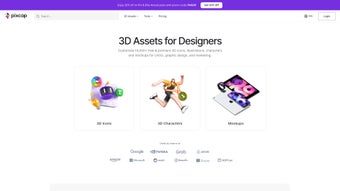
Pixcap is a cloud‑based graphic‑design platform that blends an extensive library of over 10,000 ready‑made 3D elements with intelligent AI assistance. The core idea behind Pixcap is to remove the steep learning curve traditionally associated with 3D modeling while still delivering professional‑grade visual assets. Whether you are a seasoned designer looking to accelerate concept iterations, a marketer needing eye‑catching ad creatives, or a small business owner without a design team, Pixcap lets you generate multiple design variations in minutes.
The AI engine suggests color palettes, orientation tweaks, and style adjustments based on simple text prompts, turning vague ideas into polished compositions. Finished projects can be exported in PSD or SVG formats, making it easy to import the work into Adobe Photoshop, Illustrator, or directly onto web pages. For power users, the optional Pro subscription unlocks the full 3D library, larger AI credit pools, and ultra‑high‑resolution 4K ray‑traced renders.
A built‑in community hub encourages creators to showcase their work, gather feedback, and even remix others’ designs, fostering a collaborative environment that keeps inspiration flowing. In addition, Pixcap’s subscription model includes regular updates that add new asset packs, AI enhancements, and workflow integrations, ensuring the tool stays relevant as design trends evolve. Overall, Pixcap positions itself as a bridge between quick 2D mock‑ups and full‑blown 3D pipelines, offering a secure, browser‑based experience that scales from hobby projects to agency‑level production.
Key Features & AI Capabilities
- Library of 10,000+ pre‑modeled 3D objects ranging from product mock‑ups to abstract shapes.
- AI‑driven prompt system that suggests colors, lighting, and composition tweaks.
- One‑click export to PSD and SVG, preserving layer structure for downstream editing.
- Real‑time 3D preview with drag‑and‑drop placement and rotation controls.
- Pro tier includes 4K ray‑traced rendering for photorealistic output.
- Community gallery for sharing, remixing, and receiving feedback.
- Cross‑platform web app accessible from Windows, macOS, iOS, Android, and any modern browser.
- Flexible pricing with free tier (limited AI credits) and subscription plans.
Behind the scenes, Pixcap’s AI engine leverages a combination of generative language models and vision‑based style transfer. When you type a simple instruction such as “make this logo pop with neon teal,” the system scans the current scene, identifies the relevant objects, and automatically adjusts material properties, lighting angles, and background gradients to achieve the requested effect. This approach eliminates the need to manually tweak dozens of sliders, dramatically reducing iteration time.
Moreover, the AI respects design best practices; it won’t suggest clashing colors or unrealistic shadows, ensuring that the output remains production‑ready. The platform also learns from your past edits, gradually fine‑tuning suggestions to match your personal aesthetic. For teams, the collaborative workspace allows multiple users to work on the same project simultaneously, with version history that records every AI‑driven change.
Additional features such as batch exporting, template saving, and direct integration with popular asset‑management systems make Pixcap a versatile hub for both creative brainstorming and final‑stage polish. In short, the feature set marries the creative freedom of 3D design with the speed of AI assistance, making it a compelling addition to any modern designer’s toolkit.
Installation, Compatibility & Practical Workflow
Pixcap is a web‑first application, which means there is no traditional installer for Windows or macOS. To get started, simply visit pixcap.io, create a free account, and you’ll be greeted by the dashboard. The service runs on modern browsers (Chrome, Edge, Firefox, Safari) and automatically adapts to the underlying operating system, so you can work on a Windows PC, a MacBook, an iPad, or an Android tablet without any extra steps. For users who prefer a desktop‑like experience, Pixcap offers progressive web app (PWA) support; clicking “Install App” from the browser menu creates a shortcut that launches the platform in a dedicated window, giving the feel of a native app while still leveraging cloud resources.
Supported operating systems include Windows 10 and later, macOS 11 (Big Sur) and later, iOS 14+, Android 9+, and any device capable of running a Chromium‑based browser.
Once logged in, the workflow is straightforward:
- Create a new canvas: Choose a preset size (social post, banner, product mock‑up) or set custom dimensions.
- Search the 3D library: Use keywords or filters (category, style, poly count) to find objects.
- Drag‑and‑drop onto the canvas: Position, scale, and rotate using intuitive handles.
- Invoke AI assistance: Click the “AI Prompt” button, type a brief instruction, and let the engine suggest refinements.
- Fine‑tune manually (optional): Adjust materials, lighting, and camera angles if needed.
- Export: Choose PSD or SVG, set resolution (up to 4K for Pro users), and download.
Pros
- Instant access—no heavy software downloads.
- AI reduces manual tweaking, speeding up creative cycles.
- Extensive 3D asset library saves time on modeling.
- Export formats maintain editability in industry‑standard tools.
- Cross‑device compatibility encourages flexible work habits.
Cons
- Free tier limits AI credits, which may hinder heavy users.
- Complex scenes can experience latency on slower internet connections.
- Advanced 3D manipulation (e.g., custom mesh editing) is not supported.
- Full 4K rendering is exclusive to the paid Pro plan.
- Reliance on cloud means offline work is not possible.
Pixcap delivers a fresh blend of AI and 3D assets that feels both powerful and approachable. While the free version is generous for occasional users, professionals will quickly see value in the Pro subscription for its expanded library and high‑resolution rendering. Overall, it’s a solid addition to any designer’s arsenal.
Frequently Asked Questions
Is Pixcap truly free to use?
Pixcap offers a free tier that includes unlimited access to the basic 3D library and a limited number of AI credits each month. This is sufficient for hobbyists or occasional marketers. For unlimited AI usage, full library access, and 4K rendering, a Pro subscription is required.
Can I work offline?
Because Pixcap is a cloud‑based platform, an internet connection is required for loading assets, invoking AI, and exporting designs. Offline work is not supported at this time.
What export formats are available?
Users can export projects as PSD (Photoshop) or SVG files. Both formats preserve layer information, allowing further refinement in Adobe Creative Cloud or other vector editors.
Does Pixcap support team collaboration?
Yes. The platform includes a shared workspace where multiple users can edit the same project, leave comments, and view version history. This feature is available to both free and Pro accounts.
How secure is my data on Pixcap?
Pixcap uses SSL/TLS encryption for all data transfers and stores assets on secure cloud servers compliant with GDPR and CCPA. Users can also delete projects permanently from their account dashboard.
Conclusion & Call to Action
Pixcap stands out as a versatile, AI‑enhanced design tool that bridges the gap between simple 2D graphics and full‑blown 3D modeling. Its strength lies in the massive, ready‑to‑use asset library and the intuitive prompt system that empowers creators of any skill level to produce professional visuals quickly. While the free version is generous, power users and agencies will benefit from the Pro plan’s expanded resources and 4K ray‑traced output. If you’re looking for a secure, cross‑platform solution that can accelerate marketing assets, product mock‑ups, and social media graphics, Pixcap deserves a spot in your workflow. The browser‑based nature means you’ll always have the latest features without manual updates, and the community hub provides endless inspiration and real‑time feedback.
Ready to experience AI‑driven 3D design? Sign up for a free account today and start creating stunning visuals without the steep learning curve. Whether you’re a solo freelancer, a growing startup, or a large creative agency, Pixcap’s blend of speed, flexibility, and AI intelligence can help you deliver higher‑quality work in less time.



.png)



